
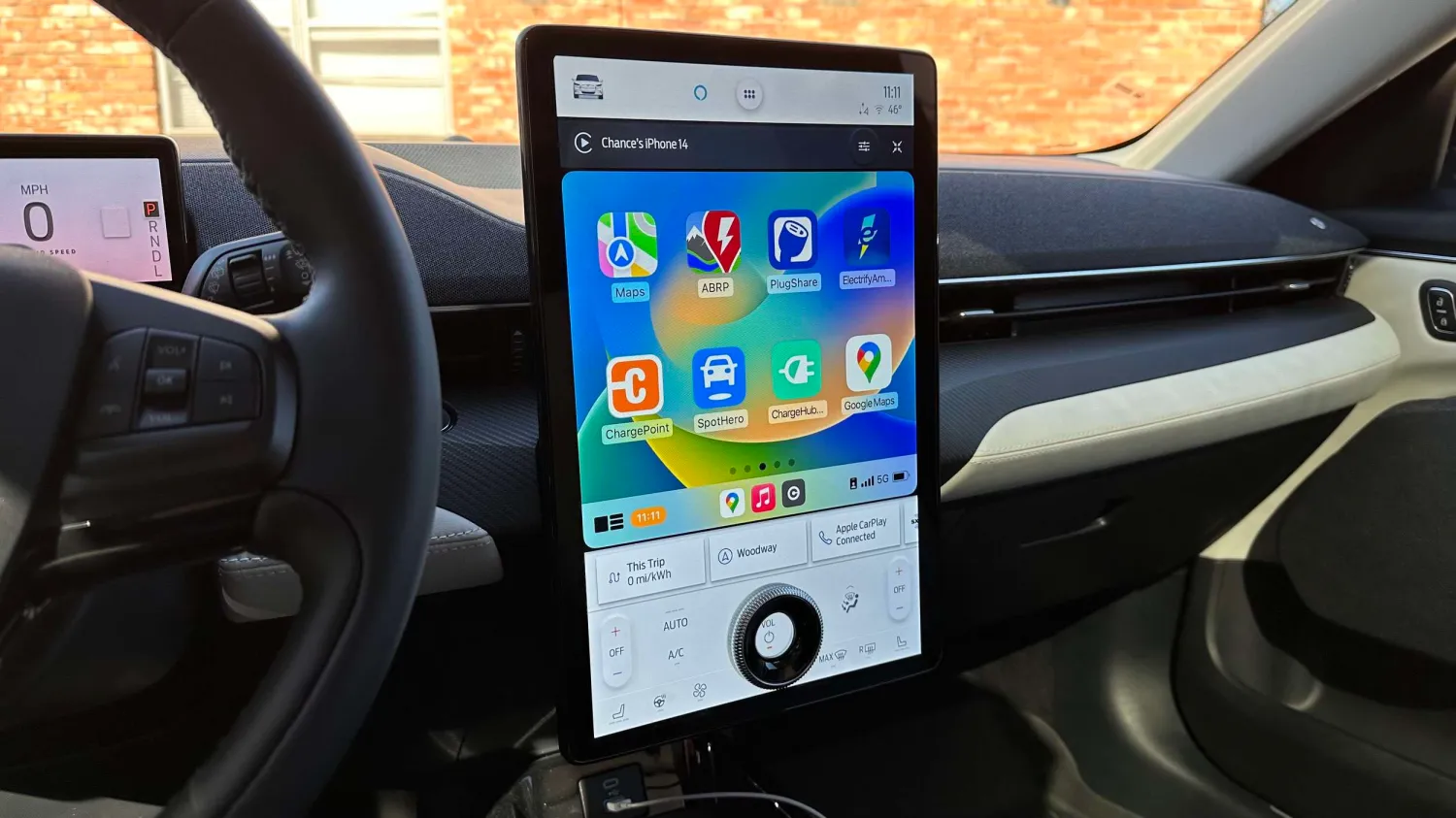
EVs that support CarPlay
Most every EV on the market offers support for Apple’s CarPlay platform, including the Ford Mustang Mach-E, The Volkswagen ID.4, the Kia EV6, the Chevy Bolt, and plenty of others. Two of the major exceptions here are Tesla and Rivian, neither of which support CarPlay and neither of which have shown any indication they plan to add CarPlay support.
CarPlay, for those unfamiliar, is Apple’s platform that basically mirrors your iPhone to your car’s infotainment system. You can access specific apps designed for CarPlay, including first-party apps from Apple, third-party apps in a handful of different categories, and interact with Siri.
For a breakdown of the best CarPlay apps across all App Store categories, be sure to check out our in-depth roundup right here.
Apple is also planning a major revamp for CarPlay that will start hitting the first supported cars sometime in late 2023. This “next generation of CarPlay” provides content for all of the driver’s screens in a car, including the instrument cluster. It will also add support for vehicle-specific features like climate controls and drive modes.
The best EV apps for CarPlay
Apple Maps
If you’re an Apple Maps user who wants to stick with Apple’s platform for navigation, the company has done an excellent job of adopting some EV-specific features over the last several years. As you’d expect, these EV-specific features are also supported via CarPlay. This also includes support for multi-stop navigation routes, which is a feature added in iOS 16 this year at long last.
The headlining feature here is support for electric vehicle routing, which means the Maps app can help you plan trips that include support for charging stops for your EV. Apple Maps, when your iPhone is connected to CarPlay, can track your car’s charge level. In some cases, you might also need to download your car manufacturer’s app from the App Store.
Apple Maps takes into account a number of different factors to determine when and how often you need to charge. This includes the availability of chargers, the speed of those chargers, elevation levels, your driving speed, and more. It will then automatically insert charging stops along your route. Additionally, if you drive until your charge gets too low, Apple Maps will present an alternative route to the nearest charging station.
To make sure you’re using all of the available EV features in Apple Maps, update your iPhone to iOS 16, which is available as a free download.
Google Maps
Google Maps offers a handful of features for EV drivers, but not to the level of Apple Maps or some of the other apps on the market. For instance, Google Maps on CarPlay doesn’t offer support for electric vehicle routing. The app doesn’t have access to your car’s battery data and won’t route you to EV chargers on a long drive.
Google Maps does offer a feature that picks the most efficient routes for EVs. The app will ask you to select your car’s “engine type,” and you can choose “electric” from the list of options. Google Maps will then pick routes that are the most energy-efficient, while also still factoring in traffic and other data points.
Google Maps also includes support for manually finding EV charging stations. It will show a few helpful details for these chargers, as well, including connector types and charging speeds. Some stations in Google Maps will also show whether a charger is available or if all of the spots are full.
If your car has Google Maps natively built-in (meaning outside of CarPlay), the EV features are more advanced. That’s unfortunately not the case for using the Google Maps app through CarPlay. Hopefully, this is something that will change in the future.
- App Store: Google Maps
Waze
Like Google Maps, Waze has a pretty lackluster selection of features for electric cars and this is true for the Waze app via CarPlay as well. The only thing Waze offers for EV owners is the ability to find nearby charging locations and chargers along your current route.
My belief is that Waze is best used alongside another navigation app. But as Apple Maps has continued to add Waze-style features, I’ve found myself relying on it less and less. The lackluster support for EV features doesn’t help the situation, either.
- App Store: Waze
A Better Route Planner
If you’re an EV driver and haven’t tried out A Better Route Planner, commonly referred to as ABRP, you’re missing out. It’s a powerful routing app and service for EV owners that offers more granularity and control over your route than any other option on the market. I’ve yet to find any app that creates plans as accurately as ABRP, nor one that offers the level of control as ABRP.
ABRP allows you to select your vehicle model, enter a destination, and get a full trip plan, including charging stops, total charging time, total trip time, and much more. You can use the app as your main navigation interface via CarPlay, allowing you to see your plan in real-time. This can factor in changes, traffic, and other things that might affect your route and charging plan.
If you don’t want to use ABRP for navigation, you can create your plan in ABRP, then use a different app for navigation to each of the ABRP stops, like Google Maps, Apple Maps, or Waze. Having all of this information accessible via CarPlay is a huge help while driving. You can also view a report after your trip that breaks down the drive time, charging time, and how they compare to the planned estimates.
ABRP is a free download with a $4.99 per month subscription ($49.99 per year) to unlock full functionality. If you’re an EV driver, this is the easiest $5 a month you can spend, in my opinion.
- App Store: A Better Route Planner
Electrify America
Electrify America is the largest alternative to Tesla’s Supercharger network, offering nearly 800 charging stations across the United States. The company offers a CarPlay app that makes it easy to find Electrify America charging stations nearby; the app can also route you directly to those charging stations.
In addition to helping you locate charging stations, the Electrify America app also presents some information about those stations. This includes things like the number of chargers available, charging speeds, the available connector types, pricing, idle fees, and more. There are also filtering options available for most of these things as well. For instance, you can filter nearby charging stations to show only chargers that have charging speeds of a certain threshold.
Additionally, you can use the Electrify America app via CarPlay to pick a specific stall at the charging location and initiate charging. This unlocks more of a “plug-and-play” style charging experience and means you don’t have to use your iPhone to do it.
Unfortunately, as of now, the Electrify America app for CarPlay doesn’t show any information while your car is charging. You’ll have to jump to your car’s native charging interface to do this or use the Electrify America app on your iPhone. The CarPlay app will, however, tell you when your car is done charging.
- App Store: Electrify America





