
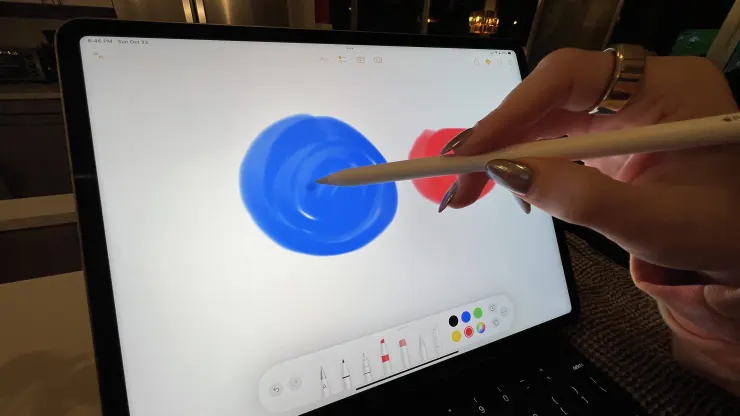
The biggest upgrade is the M2 chip, which is faster than the M1 processor used in last year’s Pro model. It also supports the new Apple Pencil Hover feature. That means the screen can now detect the tip of the Apple Pencil up to 12 millimeters above the surface of the screen, which might make it attractive to digital artists who often sketch on their iPads.
Unlike the entry-level iPad, the iPad Pro’s price didn’t increase from last year’s model. The 11-inch iPad Pro starts at $799, and the 12.9-inch iPad Pro starts at $1,099.
If you’re a 2021 iPad Pro user, it might be hard to justify upgrading to this year’s model, as there aren’t all that many noticeable improvements. And if you’re a standard iPad user – meaning you stream, read, play basic games and surf the web – shelling out $800 or more for the Pro is probably overkill.
This is more for video and photo editors, or for people who just want the best iPad with the biggest screen available.
Here’s what you need to know about Apple’s new 12.9-inch iPad Pro.
What’s good
The M2 processor is fast, which you’ll notice if you’re editing videos, or running multiple complex applications at the same time. I tried editing a video on the Pro. It quickly imported large video files and didn’t hiccup when I added filters to specific frames and rendered the video. Exporting my video file was also super fast. This was just a video capturing highlights of a trip to Europe; it was by no means a complex video project.
The screen is massive and the picture quality is excellent, but it’s not an upgrade from last year’s model. And if you opt for the 11-inch over the 12.9-inch Pro, you’ll notice the picture isn’t as good. The 11-inch model doesn’t have a “Liquid Retina XDR” display, which is just a fancy way of saying it uses mini LEDs that get super bright and colorful.
This photo shows the 12.9-inch Pro compared with the 10.9-inch entry-level iPad
I noticed the screen was brighter on the 12.9-inch Pro than any iPad I’ve used before. While watching HBO’s “House of the Dragon” on my TV at home, I often have to go into a dark room to see everything because the show is shot in dark locations and it’s often hard to see if there’s too much light reflecting on the screen. When I watched the show on the new iPad Pro, however, I noticed it was much easier to see the details on the screen, even when I was in a bright room.
The large screen also makes it easier to multitask on the iPad Pro. I liked reading the news while keeping YouTube TV open at the same time.
The Apple Pencil Hover experience is useful if you’re using your iPad to draw. Let’s say you want to mix colors. In the picture below, you can see a demo where I’m hovering red paint over a blue circle. The iPad Hover mode shows what the purple color will look like before I tap my Apple Pencil on the screen.
The speakers are clear and loud and better than on any other iPad I’ve used. I tried streaming music from the Pro in the bathroom while blow-drying my hair and I could easily make out a song’s lyrics.
The iPad Pro’s camera is excellent, but it’s also not an upgrade from last year’s model.





