
I want to put my usual warning that this is a Kickstarter campaign here. Delays and issues could come up, but Dockcase has proved to be reliable with its Kickstarter product launches. Plus, this campaign has already exceeded 15X the original goal, so I don’t think there’s any particular reason to worry. Due to previous supply constraints, the hub that I have is also silver on the outside, rather than the matte-black shown on the product page, but the hub is otherwise the same.
USB-C Expansion
There are two versions of Dockcase’s six-in-one Explorer Edition hubs. The standard one includes the USB-C port for connecting to your laptop, a 100 W USB-C power delivery port for keeping your hub and laptop powered, an HDMI port with support for 4K 60Hz, a 5 Gbps USB-C port, and three 5 Gbps USB-A ports. The other hub is referred to as the “Dockcase Pro,” and it replaces one of the USB-A ports with a gigabit Ethernet port – this is the version I have.
The connectivity acts just as you’d expect for a USB-C hub. Everything connects quickly and the power passthrough works to keep my MacBook all topped up while plugged in. It’s not a Thunderbolt device, so you won’t be able to see the typical crazy-fast 40 Gbps connection speeds to the device, with it instead splitting USB-C’s 10 Gbps connection. Still, in most cases that will be plenty – just be aware of it if you’re trying to connect multiple high-speed devices through the hub.
An upside of that USB-C connection, though, is its wide compatibility. Of course, it will be compatible with any MacBook or desktop Mac with a USB-C port, but it’s also compatible with Windows machines, Samsung Galaxy phones, Valve’s Steam Deck, and even the Nintendo Switch.
Smart features
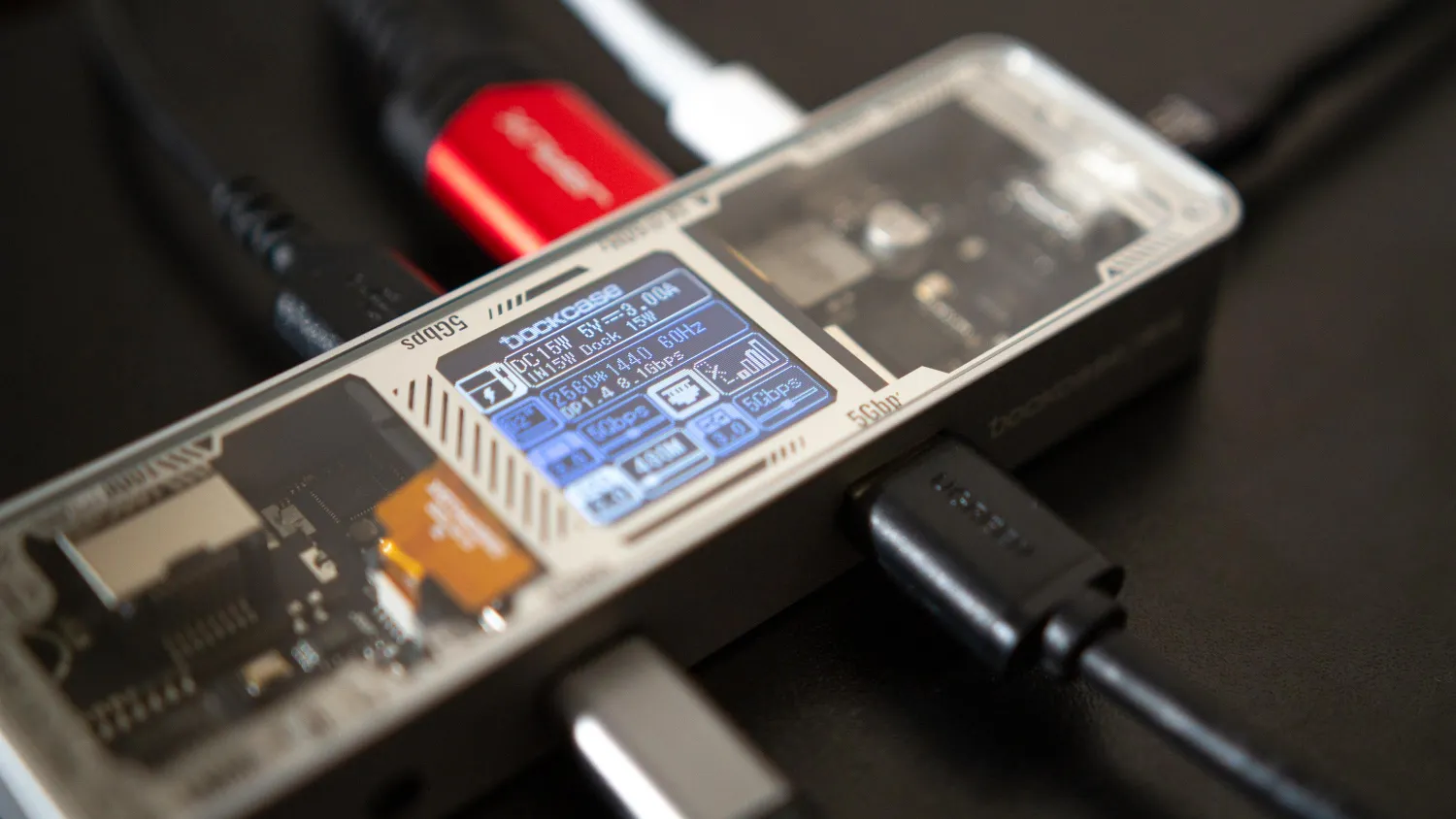
The main feature that has drawn me to so many of Dockcase’s hubs and enclosures is the built-in screen – and we see that again here. The screen is surprisingly useful for showing the status of connected devices. It will show the resolution and refresh rate of monitors connected through the HDMI port, the power being fed into the hub and to your connected device, and the speed of your USB and Ethernet connections. In the shot below, you can see the card reader and SSD I have connected to the Dockcase Pro are running at 5Gbps, while my mouse, as you would expect, is just utilizing a USB-2.0 connection.
Holding the small button on the side of the unit, you can cycle through the menus, adjusting HDMI and power settings to your liking – I’ve never seen this many options in a hub from anyone other than Dockcase.
Unique design
Finally, I have to cover the unique design. It should come as no surprise that I love taking a look inside new devices – from the Apple Watch Ultra to the 2023 MacBook Pro – the first thing I do with almost every new device I get is start taking it apart. When I first heard about Dockcase’s plan for a transparent design, I was incredibly excited – and this design lives up to my expectations.
Just like its previous products – and matching Apple’s design aesthetic – Dockcase has opted for a black circuit board. The brand’s previous products also had a glass front but had a black backing on it. They looked elegant but didn’t have the same “wow” factor as this clear glass. The glass also has metallic printing along the edges of the glass, which does a nice job of labeling the ports and subtly showing Dockcase branding. My unit has a silver aluminum casing, but the final product will feature matte-black colored aluminum. That will help the metallic printing inside the glass pop even more.
I’ve always liked Dockcase’s designs, but by far, the Explorer Edition hub is my favorite.





