
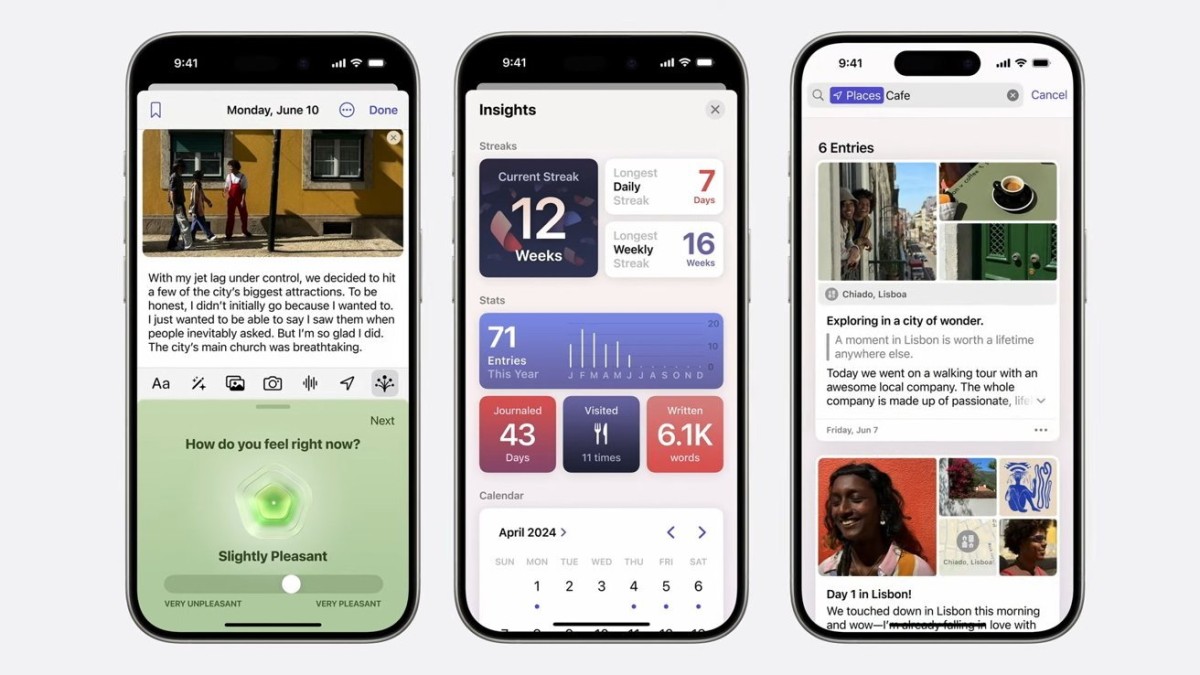
With the release of iOS 18, Apple has introduced significant enhancements to its Journal app, making it a more versatile tool for documenting personal experiences. Initially launched with iOS 17 in December 2023, Journal has now received its first major update, adding a range of new features, including search, sorting, and enhanced media support.
New Search Capabilities
One of the standout updates in the Journal app is the long-awaited Search function, which was missing from the app’s initial release. Now, users can easily search for specific entries using a new magnifying glass icon at the top of the app. This tool allows you to search by:
- Keywords or phrases (e.g., "basketball game")
- Categories like date, mood, or media type (text, photo, video, audio)
- Tags like "Bookmarked," "Places," and "Reflections"
For instance, you can search for entries containing videos related to specific keywords or filter entries by mood to reflect on past feelings. The new search filters let you quickly find what you’re looking for, no matter how vast your journal entries have become.
Moment Dates & Enhanced Sorting Options
In iOS 18, Apple introduces a new way to organize entries with Moment Dates. This feature allows users to set the date of an entry based on when an event actually happened rather than when it was written. For instance, if you’re writing about a past vacation, you can date the entry to match the original event, creating a more accurate chronological timeline.
The sorting options have also been expanded. Previously, entries were only sorted by their written date. Now, users can sort entries by Moment Date, which can be especially helpful when searching for memories from a specific time period.
Insights and Calendar View
Another new addition to Journal is Insights, a set of statistics that provides users with details about their journaling habits. Insights include:
- Average word count per entry
- Number of places visited
- Writing frequency over time
- Writing streaks and longest gaps between entries
These statistics are complemented by a new Calendar View, where users can see entries, streaks, and other metrics visually marked on a calendar.
Audio Recording & Text Customization
To make journaling even easier, Apple has added an audio recording feature. Users can now record their thoughts directly into the Journal app using the new Record button. Once an audio entry is recorded, the app can automatically generate transcriptions for easy searching and reading later.
Additionally, text customization has been improved. Users can now use colored text and highlighting, making it easier to emphasize important points or organize entries visually.
Home and Lock Screen Widgets
For quick access, iOS 18 brings Home and Lock Screen widgets to the Journal app. These widgets provide:
- Writing prompts for inspiration
- Streaks widgets to track your current writing streak or past streaks
- Quick access to features like starting a new entry, recording audio, or adding a state of mind status
To add a widget to your Lock Screen, simply press and hold the Lock Screen, tap "Customize," then select "App Widgets" below the time display. From there, scroll through the available apps and add Journal widgets as needed.
Future Enhancements with Apple Intelligence
Apple is expected to continue improving the Journal app throughout 2024 and 2025. Upcoming features powered by Apple Intelligence include:
- Summarizing long entries automatically
- Rewriting entries with different tones, making them more personal or concise
These updates will be especially useful for users with the latest iPhone models, such as the iPhone 15 Pro and iPhone 16, where Apple Intelligence is more integrated.
Final Thoughts
The iOS 18 update makes Apple's Journal app a more comprehensive and powerful tool for self-reflection and life documentation. While there’s still no iPad or Mac version, the added flexibility through audio recordings, widgets, and improved search makes it easier to maintain your journal on the go.





