
Along with delivering its largest screen yet in a 49mm case, Apple Watch Ultra comes with a screen that gets two times brighter than the rest of the wearables in the lineup.
However, for Apple Watch Ultra – Series 8, SE, and earlier – the default screen brightness isn’t set to show off its full power.
watchOS doesn’t have a setting to change auto-brightness like on iPhone even though the wearables include an ambient light sensor (since the original Apple Watch). So you’ll see the screen brightness automatically increase outside or in other environments with bright light.
Related: Apple Watch Ultra vs Series 8, SE: In-depth comparison of the new lineup
The full brightness is particularly handy when using your Apple Watch outside, but you might start to appreciate it inside too.
Turn up Apple Watch screen brightness
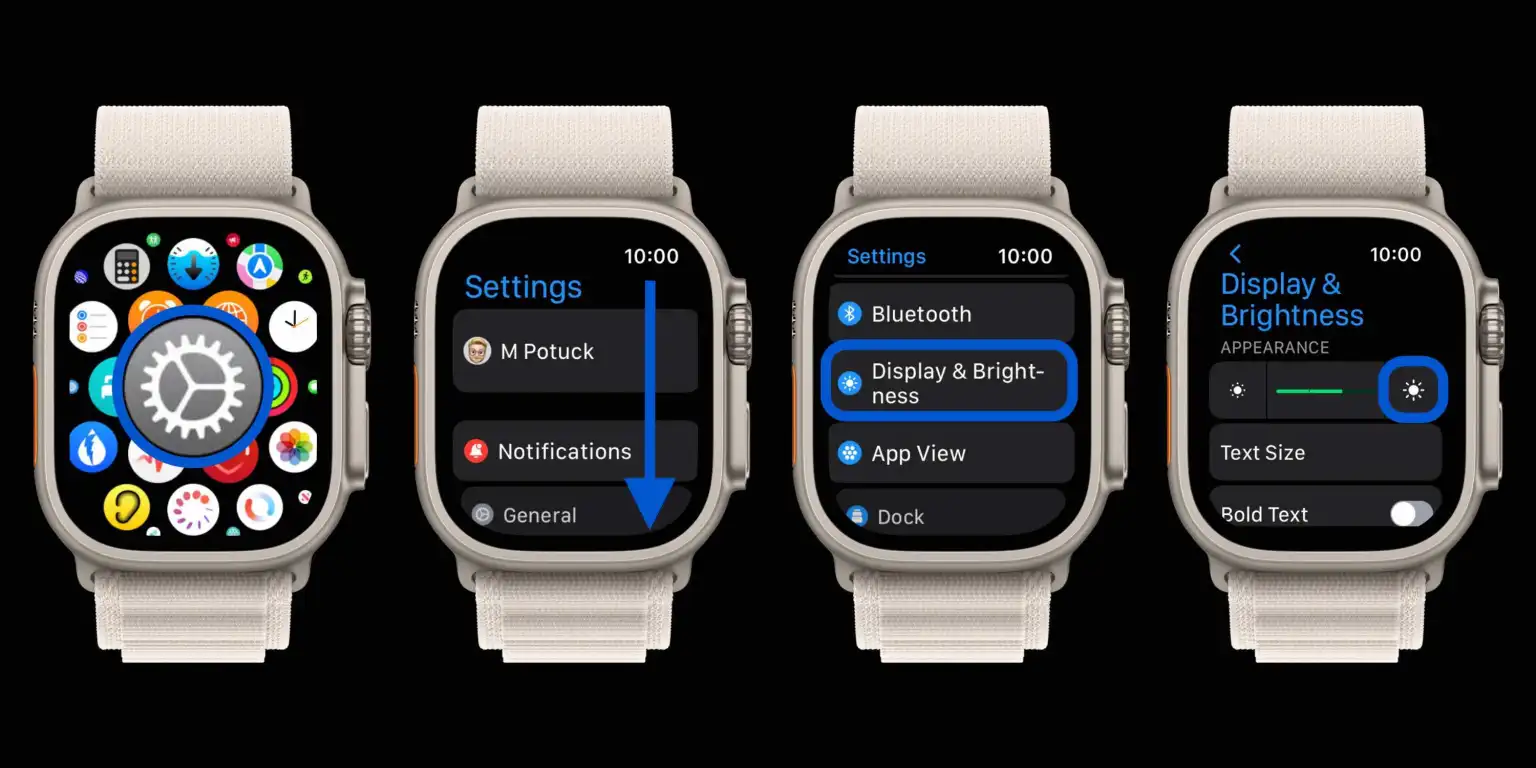
Open the Settings app on your Apple Watch
Swipe or scroll down to Display & Brightness
Tap the larger sun on the right to turn up the maximum brightness
You can also tap the green lines to change the brightness
There are only three levels of brightness to choose from and no auto-brightness adjustment
That’s it!
Keep in mind you’ll see faster battery drain with the brightness on max
The full 2,000 or 1,000 nits depending on which Apple Watch you have will only be automatically enabled in certain lighting conditions
Here’s how it looks to turn up Apple Watch screen brightness:
Apple doesn’t appear to have a support document yet describing the impact of using full brightness on the newest Apple Watches, or exactly what nits to expect when using the 3 different brightness settings.
But going for level 3 of 3 seems to be the surest way to allow for the 2,000 nits for Apple Watch Ultra and 1,000 nits as promised in Apple’s tech specs.





