
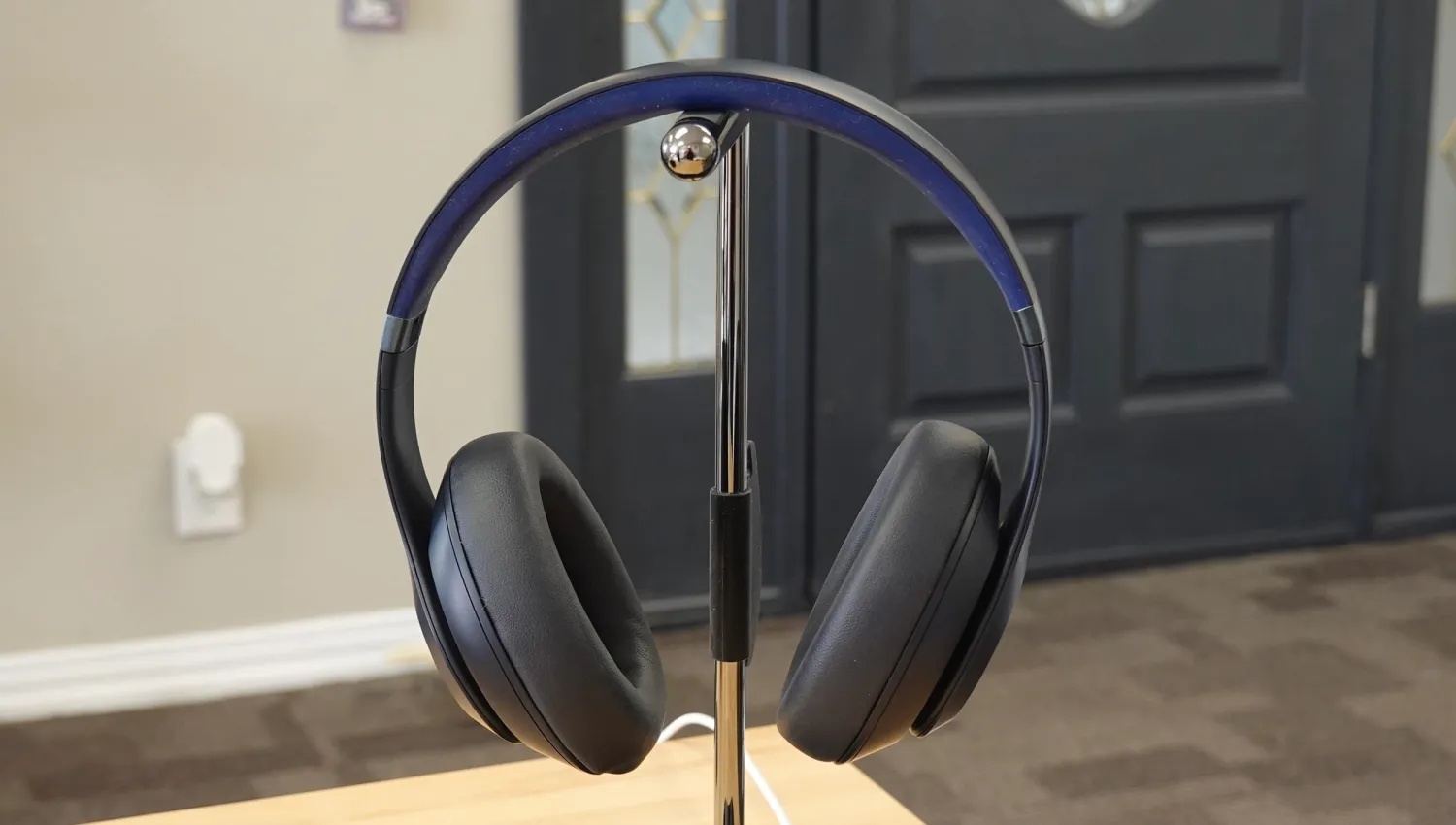
I’ve been testing the Beats Studio Pro for the past week, and they stay true to the expectations Beats has set with all of its recent products. That is: They pack a range of impressive features at a lower price than Apple’s alternatives but with a couple of omissions that could leave Apple users frustrated.
That being said: The features offered by Beats Studio Pro – and not offered by AirPods Max – make Apple’s over-ear headphones virtually impossible to recommend for now. Oh, and the Beats Studio Pro are $200 cheaper and include a 3.5mm headphone cable in the box.
Beats Studio Pro specs and features
- USB-C port that supports uplink and downlink connectivity, allowing users to listen or take a call using the USB-C cable while the headphones are charging.
- 3.5mm headphone jack for wired listening.
- Up to 40 hours of listening time with ANC/Transparency Off.
- Up to 24 hours of listening time with ANC/Transparency On.
- Beats Studio Pro offer Personalized Spatial Audio with Dynamic Head Tracking.
- Personalized Spatial Audio lets you scan your ears using your iPhone to create a unique Spatial Audio profile.
- Support for USB audio via a built-in DAC (digital-to-analog converter), for high-resolution audio playback at sample rates up to 24bit/48kHz
- 6 upgraded microphones
- MEMS-type with improved signal-to-noise ratio, highersensitivity
- Beam-forming voice microphone on each ear cup
- feed-forward and feed-back microphones on each ear cup (utilized for both ANC/Transparency and voice uplink
- Coupled with advanced digital processing, the acoustic architecture delivers tonally balanced audio with less than .02% total harmonic distortion – even at high volumes
Beats Studio Pro are available to order today for $349.99 in black, navy, sandstone, and deep brown.
Design
On the surface, you might not even recognize that the Beats Studio Pro are new. They stay true to the general Beats design language that the company has used for years. In comparison to the Beats Studio 3, you’ll notice that the “Beats” logo on the top headband has been removed.
On the side of each ear cup, you’ll see the iconic Beats “b” logo. On the left ear cup, this doubles as a multi-function button.
- Press ‘b’ once for play, pause, or answer a phone call
- Press ‘b’ twice to skip forward
- Press ‘b’ three times to skip back
- Long Press ‘b’ to activate voice assistant
- Press above/below ‘b’ to control volume up/down
On the bottom edge of the right ear cup, there’s another multi-function button and status lights to show the remaining battery capacity.
- Press multi-function button once to display remaining battery
- Press multi-function button twice to change listening modes / EQ profiles
- Press and hold for one second to power on/off
- Press and hold for three seconds to enable Bluetooth pairing mode
The Beats Studio Pro are lightweight and comfortable to wear for extended periods of time. They weigh just 260g, significantly lighter than the AirPods Max at 385g. The tradeoff, of course, is that the Beats Studio Pro are made pretty much entirely from plastic.
The Beats Studio Pro also feature a foldable design akin to pretty much every pair of over-ear headphones other than AirPods Max. This means they’ll take up far less space in your backpack than AirPods Max. The carrying case included with Beats Studio Pro is also a more traditional case than the infamous AirPods Max “case.”
The Beats Studio Pro carrying case also includes built-in pouches for the included USB-C to USB-C cable and the 3.5mm headphone cable. Yes, both cables are included in the box at no extra cost.
Big picture, the plastic design doesn’t bother me too much, but as a long-time AirPods Max user, they definitely feel less sturdy and solid. That’s a tradeoff most people, including me, are likely willing to accept. I just wouldn’t toss them in a backpack without using the carrying case for that extra layer of protection.
There’s a balance that needs to be struck when it comes to headphone design. For some people, AirPods Max go too far towards the “form over function” approach, while the Beats Studio Pro could go too far the other way. It’s clear that Beats didn’t try to reinvent the wheel, and that’s totally okay.
For listening sessions that are multiple hours long, the Beats Studio Pro remain relatively comfortable. The two things I’ve mainly noticed are that the ear cups get somewhat hot and the top of the band can get slightly uncomfortable when it’s pressing on the top of my head.
Another anecdote: I had my wife – a loyal AirPods Max user – put these on, and her first comment was: “Wow these are so light.”
Sound quality
Beats Studio Pro offer three different ways to listen: Bluetooth, USB-C, and with the 3.5mm headphone jack. Beats deserves a pat on the back for this versatility alone. Oh, and did I mention that both of those cables are included in the box?
When listening via the USB-C cable, ANC and Transparency mode are disabled. With USB-C, however, you can pick from three different sound profiles:
- The Beats Signature profile offers the most tonally balanced tuning for any genre of music.
- The Entertainment profile boosts select portions of the frequency curve for a heightened experience while watching movies or playing games.
- The Conversation profile optimizes the frequency response for voice – ideal for making calls or listening to podcasts.
When listening via USB-C, Beats Studio Pro offer high-resolution and lossless audio playback:
Thanks to a premium built-in digital-to-analog converter (DAC), Beats Studio Pro can also playback high-resolution and lossless audio formats at sample rates up to 24bit/48kHz. Enjoy pristine audio quality while streaming from compatible apps or services, like Apple Music, Tidal, or Amazon Music HD.
I’ll leave it to the experts to decide whether or not this type of lossless audio playback really sounds that much better. In my testing, I couldn’t notice a difference. Still, it’s a nice option to have for those who can (or say they can) notice a difference. After all, none of Apple’s AirPods products technically support lossless playback.
ANC and Transparency mode are both supported when listening via Bluetooth or via the 3.5mm headphone jack. And both of these features work just as well as you would expect. I’ve found them both to be just as well done on Beats Studio Pro as they are on AirPods Max.
Beats Studio Pro also offer something the company is calling “playback correction” at the final step of the ANC process:
Beats Studio Pro features playback correction as a final process at the end of the ANC signal chain. It is effectively a secondary filter driven by the feed-back microphone, designed to identify and remove any sonic artifacts that may have inadvertently been introduced via ANC or Transparency processing. The source audio is analyzed up to 48,000 times per second for real-time correction, ensuring your audio is delivered with uncompromising fidelity – regardless of which listening mode you may be using.
Another selling point of Beats Studio Pro is that they support Apple’s full range of Spatial Audio features. This includes Personalized Spatial Audio with Dynamic Head Tracking, making the Beats Studio Pro the first pair of over-ear headphones to support these features other than AirPods Max.
This is a far bigger deal than support for lossless audio for most people, including myself. I can’t notice a difference between Bluetooth and USB-C audio, but I can notice a difference when a song, movie, or TV show is playing in Dolby Atmos or not.
There will undoubtedly be people who write off the Beats Studio Pro sound quality based only on previous Beats products and preconceived notions.
I’m far from an audiophile, but I do know how I prefer to listen to music and the different aspects of songs that I prefer to hear as clearly and vividly as possible. With that in mind, I’ve been impressed with the Studio Pro sound quality and support for Active Noise Cancellation, Spatial Audio, and Transparency mode.
Apple and Android integration
Stop me if you’ve heard this before: Beats Studio Pro use a custom-designed Beats headphone processor, rather than an Apple chip like AirPods. As I’ve explained in every single one of my Beats reviews recently, the company opts for its custom-designed chip in order to offer better integration with Android. That’s probably the right decision – but it still leaves Apple users frustrated.
Here’s a rundown of the integration with iPhone, iPad, and Mac:
- One-touch pairing — easy, one-touch setup
- iCloud pairing — instantly pair with every device in your iCloud account
- iPhone/Apple Watch pairing — automatically hand-off audio to Apple Watch when iPhone is out of range
- Hands-Free Siri: Simply say “Hey Siri” to activate your voice assistant
- Find My: Locate your lost headphones on a map based on the last known connected location
- Customization: Customize the product name in the Bluetooth menu
- Updates: Receive over-the-air software updates and new features automatically
And the integration with Android:
- One-touch pairing – connect to your Android device with a single tap via Google Fast Pair
- Ecosystem Pairing – automatically pair to all Android or Chrome devices registered to your Google account
- Audio Switch: Seamlessly transition audio between your Android, Chromebook, and other compatible devices
- Find My Device: Easily locate your lost headphones with Google Find My Device
- Download the Beats app to enable additional features: Locate My Beats, Listening mode & battery life widgets, Control customization, Over-the-air updates
For Apple users, you’ll notice a few things missing. First is automatic device switching, which is Apple’s feature for automatically moving playback between multiple devices as audio begins to play on each of them. Beats has integrated a cool iPhone/Apple Watch switching feature with the Beats Studio Pro, but it’s far from the full version of automatic device switching.
The biggest limitation, however, is that Beats Studio Pro don’t automatically pause what’s playing when you take them off. This means you have to take the headphones off, then manually stop playback on your device and turn off the headphones themselves.
This is a frustration I’ve voiced multiple times, but Beats seemingly hasn’t found a way to integrate the feature. I found the lack of automatic pausing to be especially annoying when connected to my Mac, as I would take the Beats Studio Pro offer and notification sounds would continue to playback through the headphones until I disconnected them or powered them down.
Also, why do Android users get a custom My Beats app and iPhone users don’t? That doesn’t seem fair.
Dr. Dre, if you’re reading this, please hear me out: Just use Apple’s chip. Or use both chips. I have to point out these limitations in every single Beats review, and I’m tired of writing about it. It’s especially frustrating this time around because the previous-generation Beats Studio 3 used Apple’s W2 chip.





