
CONTENTS
After wearing the Apple Watch Series 8 for a while, I can confidently say that all of those things are true. Wearing the Series 8 has reminded me a lot of my Apple Watch Series 7 I’ve worn for the past year because, well, the Series 8 is practically identical to it. It’s very similar to the iPhone 14 in that way. Apple didn’t reinvent the wheel with the Apple Watch Series 8, and that’s because it’s already so far ahead of the curve that it doesn’t need to.
Call it “boring” or “bland” if you want, but that doesn’t stop the Apple Watch Series 8 from being the best smartwatch money can buy.
Apple Watch Series 8 design
What’s going on with the Apple Watch Series 8’s design? Well, it looks like an Apple Watch. Apple’s had a very clear and focused design approach ever since the original Apple Watch debuted in 2014, and while new models have improved things over the years, the general aesthetics haven’t changed very much. When you have a design foundation that’s this good, it’s understandable why that is.
Whether you get the Apple Watch Series 8 in the 41mm or 45mm trim (the version I have), both feel fantastic to wear all day long — and even throughout the night if you’re interested in sleep tracking. The watch sits comfortably on my wrist, the squircle shape is one I personally love to look at, and a WR50 rating provides waterproofing for up to 50 meters of submersion.
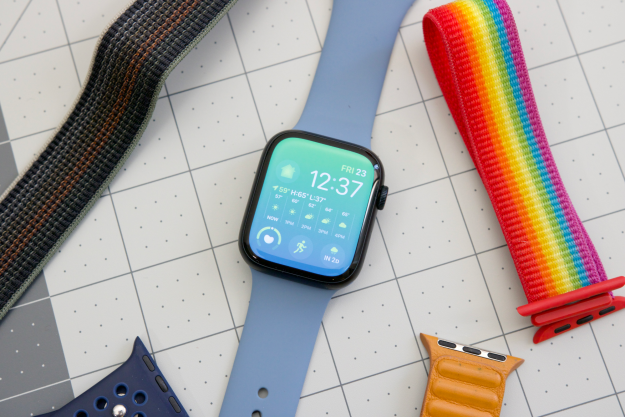
Apple’s execution of the Apple Watch’s design is also as excellent as it’s ever been. When you scroll through menus or notifications, the Digital Crown feels wonderful to interact with. Pressing the side button below it offers great tactility to swap apps or open Apple Wallet. When you’re ready to put on a new watch band, Apple’s band system is among the easiest to use.
If you’ve never liked how the Apple Watch looks, the Apple Watch Series 8 doesn’t do anything to change that opinion. But if you do like how the Apple Watch looks and feels, the Series 8 is more of what you love.
Apple Watch Series 8 screen
The standout feature of the Apple Watch Series 7 was its larger screen and slimmer bezels, enabling you to see more content on the tiny display than ever before. The Apple Watch Series 8 recycles that same design, and just like last year, it creates a truly impressive viewing experience. Watch faces have room to shine, notifications creep out to the very edges of the screen, and navigating apps/menus never feels restrictive — especially on the larger 45mm model.
And it’s not just the size of the screen that’s so impressive. Colors pop with vibrancy, text is easily readable, and the 1,000 nits of peak brightness ensure you can easily read the watch even in broad daylight.
When you’re not interacting with apps or notifications, the Apple Watch Series 8 has an always-on display to show a dimmed version of your watch face at all times. The Apple Watch has had an always-on display since the Series 5, so while it’s nothing new, it still remains one of my favorite Apple Watch features. Being able to subtly glance down and see the time, weather, and other info without needing to raise my wrist is enormously convenient — and one of the biggest missing features from the cheaper Apple Watch SE 2.
Apple Watch Series 8 health and activity
The market for health/fitness trackers in 2022 is crowded, to say the least. From Fitbit, Garmin, Oura, Amazon Halo, Whoop, Amazfit, and more, the myriad of options to track your daily activity often feels overwhelming. Despite all of that, Apple has done an incredible job of making the Apple Watch’s health and activity suite feel simultaneously approachable, intuitive, and comprehensive.
The crux of activity tracking on the Apple Watch Series 8 revolves around your activity rings — more specifically, your Move, Exercise, and Stand rings. Each one encourages you to burn calories, perform X amount of exercise minutes, and get up and stand throughout the day. It’s one of the most recognizable activity metrics around and has created something of a cultural phenomenon to “close your rings” every day.
If you’ve ever used an Apple Watch, you’ll know precisely why that is. Aiming to close your rings each day is fun, challenging, and a clear metric to work toward. It’s still not great at promoting recovery days, but third-party apps (like Gentler Streak) help to fill that void.
To measure your ring progress throughout the day, the Apple Watch Series 8 records a vast array of health metrics. It tracks your steps, distance, resting and active energy, and 24/7 heart rate. There’s also an ECG app to get on-demand ECG readings, a SpO2 sensor for manual and automatic blood-oxygen level tracking, and sleep tracking to measure the quality of your slumber at night. You can use all of these features if you’d like, pick and choose the ones you want, or ignore all of them.
While health tracking on Apple Watch Series 8 is nearly identical to previous models, Apple’s WatchOS 9 software does add a few nifty additions. Some exercises now show heart rate zones in real-time, making it much easier to gauge the intensity of your workouts. Speaking of workouts, WatchOS 9 allows you to create custom workout routines that you can tweak with custom time, distance, calorie, and pacer goals. And when it comes time to rest up, WatchOS 9 adds sleep stages to show you how much time you’ve spent in REM, Core, and Deep sleep (critical data that was previously missing in WatchOS 8).
Apple Watch Series 8 temperature sensors
That said, there is one new hardware addition to the Apple Watch Series 8’s health toolkit — a pair of temperature sensors. Using one sensor on the back and another underneath the display, the Apple Watch Series 8 tracks your wrist temperature and displays those readings in the Health app on your iPhone. You need to enable sleep tracking and wear the Series 8 for about five nights before it establishes a baseline, but once that’s done, you’ll see a new Wrist Temperature section in the Health app.
Per Apple’s website, wrist temperature changes can be related to your “diet and exercise, alcohol consumption, sleep environment, or physiological factors such as menstrual cycles and illness.” It’s a neat metric to have, but I also don’t know what to do with it. I see my wrist temperature in the Health app, but there’s no guidance about what these numbers mean. My temperature was 1.05 degrees higher on September 19 but 0.59 degrees lower on September 26. There’s probably some meaning to that, but I have no idea what it is. I’ll give Apple credit for doing something out of the box with its temperature sensors (unlike the Galaxy Watch 5), but I’m much more interested in seeing what third-party apps do with this data.
There is another aspect of the Series 8’s temperature sensors, but it’s not a feature I’ve been able to test. After wearing the Apple Watch Series 8 for five nights, users who take advantage of Apple’s Cycle Tracking app will see retrospective estimates for when they last ovulated — something potentially very helpful for family planning.





