
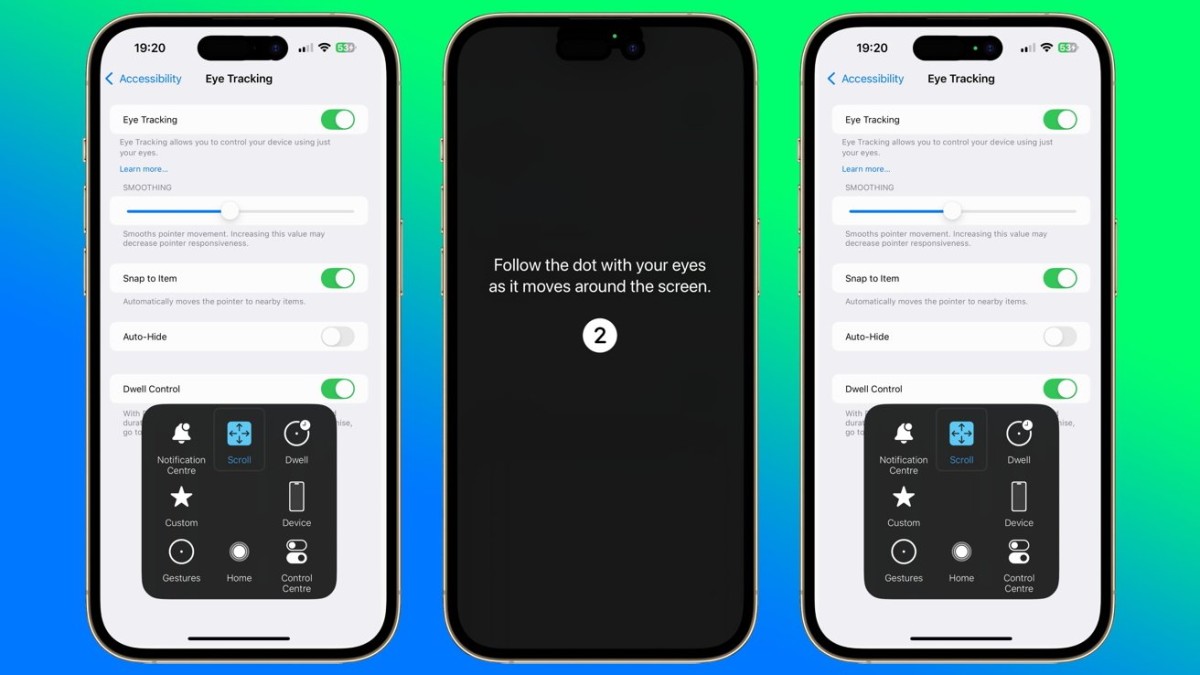
At the recent WWDC keynote, Apple revealed an exciting new feature for iOS 18: Eye Tracking. This innovative technology allows iPhone and iPad users to navigate their devices without touching the screen, providing a valuable tool for those with physical disabilities.
How Eye Tracking Works
Eye Tracking technology uses the front-facing camera on an iPhone or iPad, combined with on-device machine learning, to determine where a user is looking on the screen. This allows users to interact with their device simply by moving their eyes.
In May, Apple previewed this accessibility feature, showcasing how it helps users who may have difficulty interacting with touchscreen displays. The technology, which is also used in the Apple Vision Pro, tracks what the user is looking at, enabling selection and interaction with screen elements through eye movement.
Setting Up Eye Tracking
Setting up Eye Tracking on iOS 18 is straightforward. Users can enable the feature by going to the Settings app, selecting Accessibility, and then choosing Eye Tracking under the Physical and Motor group. The setup involves following a dot around the screen with your eyes, allowing the device to calibrate to your gaze.
Dwell Control and Customization
Once Eye Tracking is enabled, a setting called Dwell Control is also activated. This feature allows users to select items on the screen by maintaining their gaze on a particular spot for a few seconds. Users can customize Dwell Control settings through Assistive Touch, adjusting the sensitivity and responsiveness of the pointer.
Additional features include Smoothing, which helps stabilize the pointer movement, and Snap to Item, which makes the pointer gravitate towards the nearest selectable item. These options make it easier for users to interact with their devices, especially when precision is required.
Practical Applications
Eye Tracking is particularly beneficial for users with mobility issues, providing an alternative method of device interaction. For example, students or professionals with limited hand use can navigate their iPhone or iPad more easily. The feature also includes a customizable dot that can expand to access key functions such as Notification Center and Control Center.
While the technology is still in its early stages and not entirely perfect, it shows significant promise. Users may experience occasional accuracy issues, but these can often be corrected by adjusting the position of the device or the user's gaze.
Apple's Eye Tracking technology in iOS 18 is a game-changer for accessibility. It provides a new way for users to interact with their devices, making technology more inclusive and accessible for everyone. As this feature continues to develop, it is likely to become an indispensable tool for many users.





