
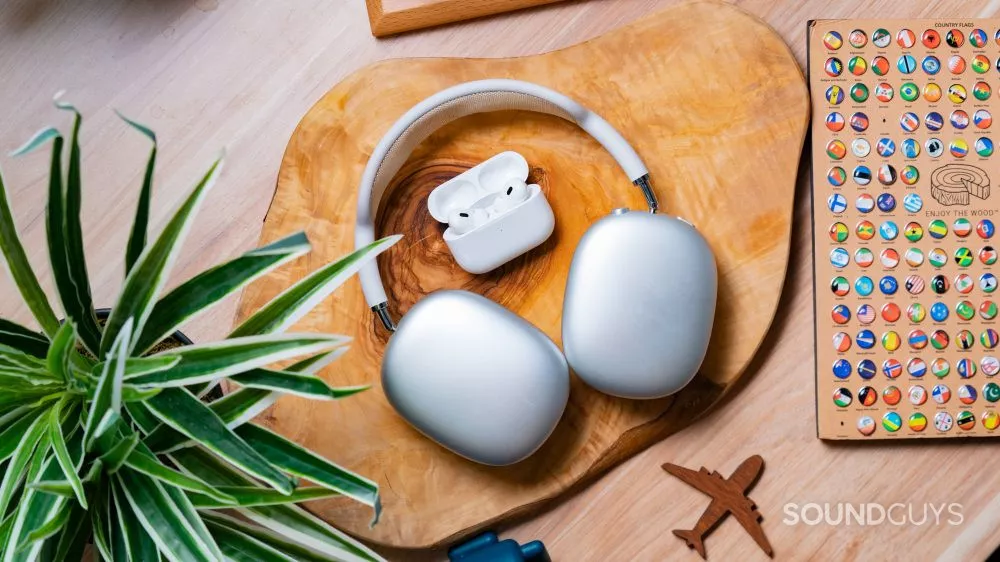
What’s it like to use the Apple AirPods Pro (2nd generation) compared to the Apple AirPods Max?
The Apple AirPods Pro (2nd generation) is very similar to the previous generation, still featuring glossy white stemmed earbuds with a rounded rectangular case. The case has a speaker in it, so you can locate it if it gets lost using Find My AirPods. Both the AirPods and the charging case are IPX4 rated, so they can both handle splashes of water without sustaining damage. The AirPods Pro (2nd generation) comes with four ear tip sizes, including the usual small, medium, and large, with the addition of an extra-small pair of ear tips.
On the other hand, the Apple AirPods Max is a pair of over-ear headphones, much different from the AirPods Pro. A mesh canopy headband evenly distributes the headset’s 386g weight along your head. The metal headphones feature a rounded rectangular shape, similar to the AirPods Pro charging case. Unlike Apple’s in-ears, the headphones come in four colors: silver, Space Gray, Sky Blue, pink, and green.
You get a Smart Case that doesn’t really protect the headset. Instead, the Smart Case forces the AirPods Max into low power mode. Without the Smart Case, it takes 72 hours of inactivity before the AirPods Max enters low power mode. The AirPods Max is not IP rated, so it’s not safe to take out into the rain or spill any liquids on.
How do you control the Apple AirPods Pro (2nd generation) and Apple AirPods Max?
Controlling the Apple AirPods Pro (2nd generation) is done through squeezing and swiping gestures on the stem of the earbud. You can remap some of the controls in the Settings app of an iOS/iPadOS device.
Apple AirPods Pro (2nd gen) controls:
To control the Apple AirPods Max, there is a digital crown button on the top of the right ear cup for controlling volume and playback, as well as a noise cancelling button to toggle between ANC and transparency modes. The AirPods Max doesn’t support touch controls.
Apple AirPods Max controls:
The software options for both the Apple AirPods Pro (2nd generation) and the Apple AirPods Max are very similar. Both use the iOS or iPadOS Settings app to access software options and customization, making all of it inaccessible to Android users.
In the Settings app, there are features like personalized Spatial Audio, customization of some of the controls, firmware updates, noise controls, and Find My AirPods available to both the AirPods Pro (2nd generation) and the Apple AirPods Max.
The biggest differences between the two is that the AirPods Pro (2nd generation) has a more updated Find My AirPods setup, since the case now has a speaker which makes a sound to help you locate it, and the ultra-wideband U1 chip allows for precision tracking. This does require you to share your location, which isn’t ideal for the privacy-inclined. While both sets of AirPods feature Transparency mode that transmits external noise through the headset, the AirPods Pro (2nd generation) takes it one step further with Adaptive Transparency powered by the H2 chip. When you enable this feature on the second-generation AirPods Pro, unpredictable, loud noises don’t come through as loud and piercing as they might through the AirPods Max or older AirPods models.
How do the Apple AirPods Pro (2nd generation) and Apple AirPods Max connect?
With the Apple AirPods Pro’s H2 chip and the AirPods Max’s H1 chip, both connect easily to Apple devices. Taking either out of its case and putting it near an Apple device will trigger a screen prompt on your device to connect. The chip integration with Apple devices makes it easy to quickly connect and switch between devices logged into the same iCloud account.
The AirPods Pro (2nd generation) uses Bluetooth 5.3, while the AirPods Max uses Bluetooth 5.0. Both only support the AAC and SBC Bluetooth codecs, which is great for Apple users, but that means there’s no reliable high-quality Bluetooth audio option for Android users (unsurprisingly). You can listen to the AirPods Max over a wired connection using a Lightning cable with an adapter to plug it into a 3.5mm port.
In our battery testing, of constant music playback peaking at 75dB(SPL), the Apple AirPods Pro (2nd generation) lasted 5 hours, 43 minutes with ANC on, which is just a bit short of Apple’s advertised 6-hour battery life. The charging case adds an additional 24 hours of listening time to the earbuds, or 19 hours, 30 minutes of talk time.
The Apple AirPods Max lasts much longer at almost 21 hours with ANC on. As mentioned earlier, the AirPods Max doesn’t have an off button, so it constantly drains battery when it’s not in use. It goes into low power mode if you put it in its case, but even then it’s still draining the battery a little.
The battery draining issue of the AirPods Max and the small battery life of the AirPods Pro don’t make for the most environmentally friendly options. The more charge cycles a battery goes through, the shorter its life becomes. If you want to avoid creating battery e-waste with your headphones, you should opt for headphones with a longer battery life, or wired ones. The most environmentally conscious people may not want either of these options.
Does the Apple AirPods Pro (2nd generation) or Apple AirPods Max block noise better?
The Apple AirPods Pro (2nd generation) and the Apple AirPods Max both have excellent noise cancelling, but the AirPods Max is just marginally better. For reference, our score for the AirPods Pro (2nd generation) is 8.2/10 and for the AirPods Max it’s 8.3/10. The AirPods Pro just has two little dips, one between 100-200Hz, and one between 3-8kHz, where it just doesn’t quite match the AirPods Max. Nevertheless, both are amazing at cancelling out noise.
Both also have good isolation, with the AirPods Max having just slightly better isolation in the low end, and the AirPods Pro having better isolation in really high frequencies. A proper fit is integral for good isolation and good noise cancelling, since having outside noise leaking in will diminish the performance of both. This can lead you to turn up your volume to dangerous levels, putting you at risk of noise-induced hearing loss.
Does the Apple AirPods Max sound better than the Apple AirPods Pro (2nd generation)?
The AirPods Max and the AirPods Pro (2nd generation) have largely similar sound profiles in the lows and midrange, both of which measure close to our target curve in our testing. The AirPods Pro puts out less level in the highs relative to our target. The AirPods Max is a touch under-emphasized in the upper mids and uses a different tuning, leading to comparatively more output at the high end. Either will sound quite good to most people, which is fortunate, because you can’t change the EQ without the help of a third-party app.
If you want to change the sound profile of either of these headsets outside of Apple Music, you won’t be able to do so using the default software. As of now, there are no EQ presets or custom EQ options in the Settings app.





