
What’s it like to use the Apple AirPods Pro (2nd generation) compared to the Apple AirPods Max?
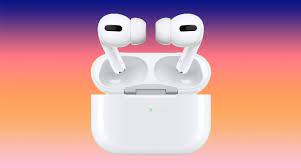
The Apple AirPods Pro (2nd generation) is very similar to the previous generation, still featuring glossy white stemmed earbuds with a rounded rectangular case. The case has a speaker in it, so you can locate it if it gets lost using Find My AirPods. Both the AirPods and the charging case are IPX4 rated, so they can both handle splashes of water without sustaining damage. The AirPods Pro (2nd generation) comes with four ear tip sizes, including the usual small, medium, and large, with the addition of an extra-small pair of ear tips.
On the other hand, the Apple AirPods Max is a pair of over-ear headphones, much different from the AirPods Pro. A mesh canopy headband evenly distributes the headset’s 386g weight along your head. The metal headphones feature a rounded rectangular shape, similar to the AirPods Pro charging case. Unlike Apple’s in-ears, the headphones come in four colors: silver, Space Gray, Sky Blue, pink, and green.
You get a Smart Case that doesn’t really protect the headset. Instead, the Smart Case forces the AirPods Max into low power mode. Without the Smart Case, it takes 72 hours of inactivity before the AirPods Max enters low power mode. The AirPods Max is not IP rated, so it’s not safe to take out into the rain or spill any liquids on.
How do you control the Apple AirPods Pro (2nd generation) and Apple AirPods Max?
Controlling the Apple AirPods Pro (2nd generation) is done through squeezing and swiping gestures on the stem of the earbud. You can remap some of the controls in the Settings app of an iOS/iPadOS device.
Apple AirPods Pro (2nd gen) controls:
To control the Apple AirPods Max, there is a digital crown button on the top of the right ear cup for controlling volume and playback, as well as a noise cancelling button to toggle between ANC and transparency modes. The AirPods Max doesn’t support touch controls.





